

Are you planning your next hiking adventure and wondering if your Apple Watch can keep up? Knowing whether your watch has GPS is crucial for tracking your route, staying safe, and making the most of your hike.
Imagine having reliable directions right on your wrist, without needing to carry extra devices. You’ll discover exactly how the Apple Watch handles GPS for hiking and what features you can count on during your outdoor trips. Keep reading to find out if your Apple Watch is the perfect hiking companion you’ve been looking for.
Apple Watch Gps Features
The Apple Watch offers several GPS features useful for hiking. It helps track your route, distance, and speed without carrying extra devices.
Understanding these features can help you choose the right model for your outdoor trips.
Built-in Gps Capabilities
Many Apple Watch models have built-in GPS. This means the watch can find your location using satellites alone.
You do not need your phone for GPS tracking during hikes. The watch records your path and stores the data for later review.
Gps Accuracy On Trails
The GPS on Apple Watch is accurate enough for most hiking needs. It tracks your movement on trails with good precision.
Some natural obstacles like thick trees or deep valleys may affect signal quality. Still, the watch generally keeps a reliable GPS lock outdoors.
Models With Gps Support
Apple Watch Series 2 and later include built-in GPS. Earlier models need to connect to an iPhone for location data.
GPS-only models cost less but lack cellular features. Cellular versions offer GPS plus phone connectivity without your phone.
Credit: finuniverblg.ru.net
Benefits For Hiking
Hiking requires tools that help you stay on track and safe. The Apple Watch offers several features that assist hikers. It makes your outdoor experience more organized and secure. Here are some benefits of using the Apple Watch for hiking.
Route Tracking And Mapping
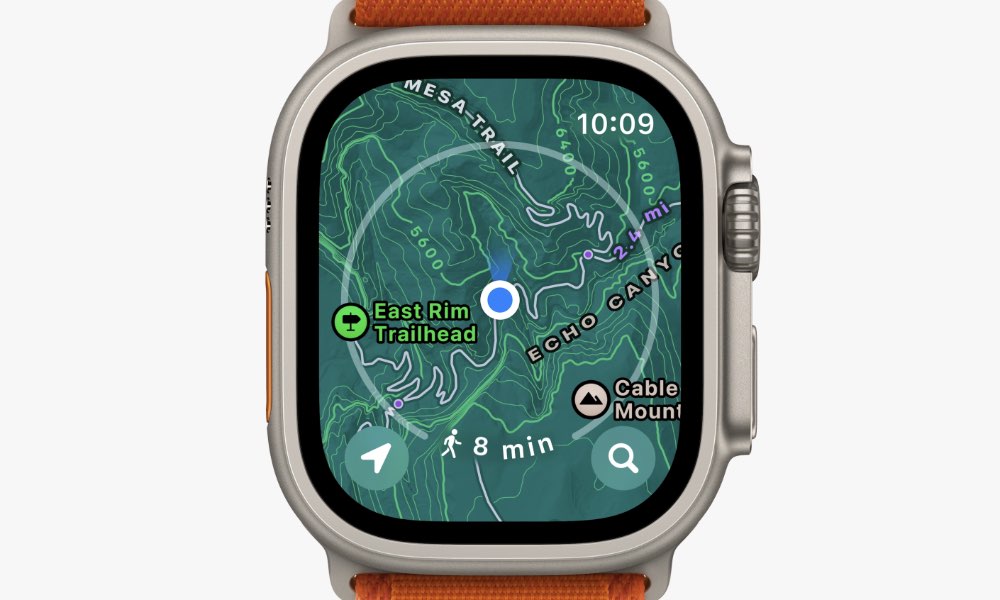
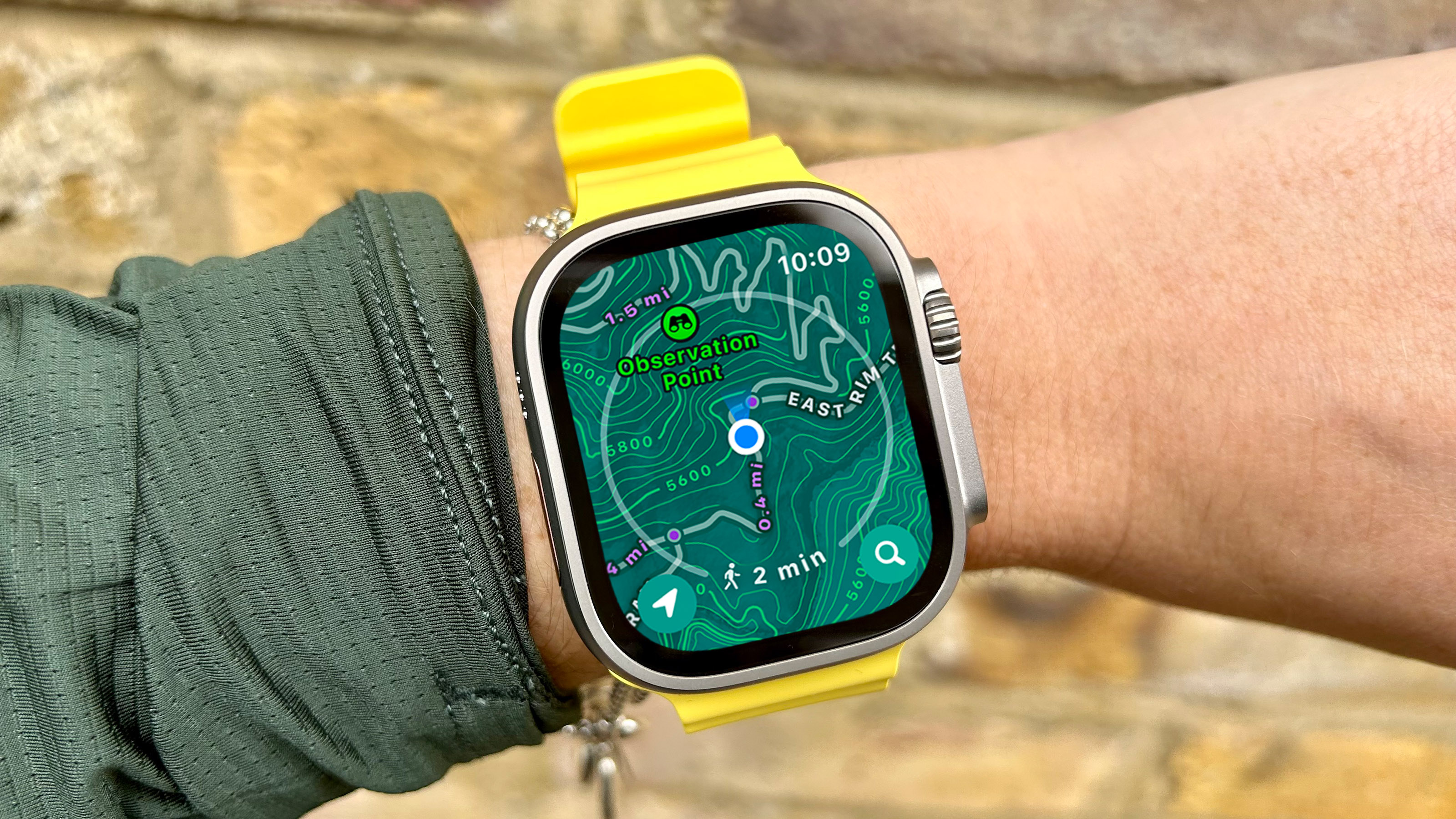
The Apple Watch records your hiking path in real-time. It shows your route on the screen clearly. This helps you avoid getting lost on unfamiliar trails. You can also review your path after your hike. It gives you a clear map of where you walked.
Elevation And Terrain Monitoring
The watch measures changes in elevation during your hike. It shows how high or low you have climbed. This helps you understand the difficulty of your route. Knowing the terrain helps you prepare for steep or rough areas. It keeps your hike safe and manageable.
Safety And Emergency Features
The Apple Watch has tools to keep you safe outdoors. It can detect if you fall and send alerts for help. Emergency SOS lets you call for help quickly. These features provide peace of mind on remote trails. Safety is a key benefit for every hiker.
Using Apple Watch For Trail Navigation
The Apple Watch is a handy tool for hiking and trail navigation. It offers features that help you find your way on trails. You can track your location and follow routes without carrying extra devices. The watch’s GPS works with apps to guide you safely.
Here is how to use the Apple Watch for trail navigation during your hikes.
Setting Up Gps For Hiking
Start by turning on the GPS in your Apple Watch settings. Open the Settings app and go to Privacy & Security. Tap Location Services and make sure it is enabled. Then, allow location access for the hiking or maps apps you want to use. This setup helps the watch connect to GPS satellites and track your position on trails accurately.
Using Maps And Compass Apps
The Apple Watch comes with built-in Maps and Compass apps. Use the Maps app to see your current location and nearby trails. It shows directions and helps you follow routes. The Compass app points you in the right direction. Together, these apps guide you through unfamiliar terrain. You can also download third-party hiking apps for more detailed trail maps and tracking features.
Offline Gps Functionality
The Apple Watch can use GPS without a phone nearby. This is helpful in areas with no cell signal. Download maps or routes to your watch before hiking. The watch will track your position and guide you using saved data. This offline GPS function keeps you on course even in remote places. Make sure your watch has enough battery for long hikes.
Credit: sirelmagroup.it
Battery Life During Outdoor Use
Using an Apple Watch for hiking means relying on its battery throughout the trip. Outdoor activities often last several hours. The watch’s battery life is key to tracking your route and staying connected. Understanding how GPS affects battery life helps plan your hike better.
Gps Impact On Battery
GPS uses more power than many other features on the Apple Watch. It constantly searches for satellite signals to track your location. This continuous use drains the battery faster. Hiking with GPS active can reduce your watch’s battery life by half or more. The exact drain depends on the watch model and settings.
Tips To Extend Battery Life
Turn off unnecessary features like Wi-Fi and cellular if not needed. Lower screen brightness to save power. Use airplane mode to stop wireless connections. Close apps running in the background. Start your hike with a fully charged watch. Carry a portable charger for longer trips. These simple steps help keep your watch powered longer.
Power Reserve Mode
Power Reserve Mode shows only the time and stops most functions. It saves battery by turning off all features except basic time display. You can activate it when the battery is low. This mode helps you keep track of time during long hikes. It gives extra hours before the watch shuts down completely.
Comparing Apple Watch To Other Gps Devices
Comparing the Apple Watch with other GPS devices highlights its unique features and trade-offs. The Apple Watch offers a mix of smart features and GPS tracking. Dedicated GPS devices focus solely on navigation and outdoor use. Understanding their differences helps hikers pick the best tool for their needs.
Advantages Over Traditional Gps Units
The Apple Watch fits comfortably on the wrist. It tracks location, heart rate, and activity all in one device. This watch connects to your phone for calls and messages. It has a bright, colorful screen that shows maps and directions clearly. The watch updates software automatically. This keeps its GPS and health features current. Battery life lasts through most hikes. The watch also offers emergency SOS features. These improve safety on the trail.
Limitations Compared To Dedicated Devices
Dedicated GPS units often have longer battery life. Some last days without charging, unlike the Apple Watch. They usually have larger screens, easier to read outdoors. These devices work well in remote areas without phone signals. The Apple Watch relies on a phone for some features. It may lose GPS signal in dense forests or deep valleys. Also, the watch lacks advanced mapping options found in specialized devices. It may not support some hiking-specific data formats. Serious hikers might find these limits important.
Enhancing Hiking Experience
Hiking with an Apple Watch can change how you explore nature. The built-in GPS helps you find your way. This feature adds safety and confidence on trails. Beyond GPS, the watch offers tools to make your hike better. Tracking your health and using apps boosts the adventure.
Customizing the watch face to show trail info keeps you focused. These features work together for a smoother hiking day. The Apple Watch is more than a timekeeper on your wrist.
Third-party Hiking Apps
Many apps support hiking on the Apple Watch. They offer maps, route planning, and tracking. Apps like AllTrails and Gaia GPS work well. They provide detailed trail info and offline maps. These apps use the watch’s GPS to track paths. They also mark waypoints and important spots.
Health And Fitness Tracking
The watch tracks heart rate and calories burned. It counts steps and measures distance traveled. This info helps hikers understand their fitness level. Alerts for heart rate keep you safe on tough trails. Monitoring breathing and recovery time aids endurance. This data supports better hiking habits over time.
Customizing Watch Faces For Trails
You can set watch faces to show hiking info. Add complications like compass, elevation, and weather. Quick access to this data saves time on the trail. Choose faces with large numbers for easy reading. Custom faces help keep your focus on nature, not the watch.

Credit: www.esquim.com
Frequently Asked Questions
Does Apple Watch Have Built-in Gps For Hiking?
Yes, most Apple Watch models have built-in GPS. This helps hikers track routes, distance, and pace without carrying a phone.
Can Apple Watch Gps Work Without Iphone Nearby?
Apple Watch GPS functions independently on GPS-enabled models. You can hike and track location without your iPhone nearby.
How Accurate Is Apple Watch Gps For Hiking?
Apple Watch GPS is highly accurate. It uses multiple satellite systems to provide reliable location data during hikes.
Which Apple Watch Models Support Gps For Hiking?
Apple Watch Series 2 and newer models include built-in GPS. These are suitable for hiking and outdoor activities.
Conclusion
The Apple Watch includes GPS, which helps during hiking trips. It tracks your route and shows your location clearly. You do not need your phone to use GPS on the watch. This feature makes hiking safer and more fun. Battery life may vary, so plan your hike accordingly.
Overall, the Apple Watch is a useful tool for outdoor adventures. It offers simple navigation and fitness tracking in one device. Consider your needs and watch model before buying for hiking.