
Imagine standing at the edge of a dense forest, ready to explore the trails ahead. You want to make sure you don’t get lost and can find your way back safely.
That’s where a GPS device becomes your best hiking companion. If you’ve ever wondered how to use a GPS device for hiking, this guide is for you. You’ll learn simple steps to navigate confidently, track your path, and enjoy your adventure without worry.
Keep reading, and soon you’ll know exactly how to make your hikes safer and more fun.

Credit: hikingguy.com
Choosing The Right Gps Device
Choosing the right GPS device is important for a safe and fun hiking trip. The right device helps you find your way and avoid getting lost. Different GPS devices offer different features and prices. Knowing what to pick makes your hiking easier and more enjoyable.
Types Of Gps Devices
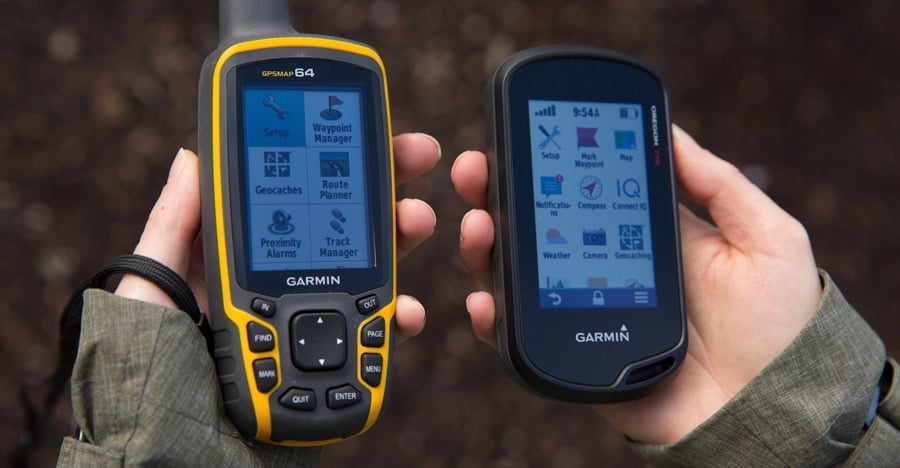
Handheld GPS units are popular for hiking. They are small and easy to carry. Smartphones can use GPS apps but may lose signal in the forest or mountains. Some watches also have GPS built in. They are good for quick checks but may lack detailed maps. Choose the type that fits your hiking style and needs.
Key Features To Consider
Look for a GPS device with a clear screen. It should be easy to read in sunlight. Battery life matters a lot. Long battery life means less worry on long hikes. Maps and waypoints help you track your route. Waterproof or water-resistant devices last longer outdoors. A device with good signal range helps you stay connected.
Budget Vs. Performance
Cheap GPS devices may have fewer features and lower accuracy. Expensive models offer better maps and longer battery life. Think about how often you hike and where. For casual hikes, a basic device might be enough. For serious or long hikes, invest in a reliable, high-performance GPS. Balance your budget with what you really need.
Setting Up Your Gps Device
Setting up your GPS device is the first step for a safe hiking trip. A well-prepared GPS helps you find trails and avoid getting lost. Follow these simple steps to prepare your device before heading outdoors.
Installing Maps And Software
Start by installing the right maps for your hiking area. Most GPS devices come with basic maps, but detailed maps improve accuracy. Download maps from the official website or use the device’s app.
Next, install any necessary software on your computer or phone. This software helps manage maps and routes. Connect your GPS device to your computer and follow the instructions to add maps.
Calibrating The Device
Calibration ensures your GPS shows correct locations. Turn on the device in an open area with a clear sky. Wait for the GPS to find satellites. This may take a few minutes.
Follow the device prompts to complete calibration. Some devices ask you to move in a specific pattern. Calibration improves tracking and helps avoid errors on trails.
Updating Firmware
Firmware updates fix bugs and add new features. Connect your GPS to a computer with internet access. Open the device’s update software and check for new firmware versions.
Download and install updates as soon as they are available. Keeping firmware current boosts device performance and reliability during your hike.
Basic Gps Functions For Hiking
Using a GPS device while hiking makes navigation easier and safer. Basic GPS functions help you find your way, mark important spots, and follow planned paths. Knowing these functions improves your hiking experience and helps avoid getting lost.
Tracking Your Location
Your GPS device shows your exact position on a map. It uses satellites to give accurate coordinates. This feature helps you see where you are on the trail. You can check your location anytime to stay on course. It also shows your speed and distance traveled.
Marking Waypoints
Waypoints are markers you save on your GPS. Use them to note important places like campsites or water sources. You can return to these spots easily by following the waypoint. Marking waypoints helps plan breaks and find your way back.
Using Routes And Tracks
Routes are planned paths you follow on your hike. Tracks record the path you have traveled. You can load routes into your GPS before hiking. The device guides you along the route step by step. Tracks let you review where you walked after the hike.
Advanced Gps Features
GPS devices for hiking come with many advanced features. These tools make hiking safer and more fun. Learning these features helps you use your GPS better on the trail. They provide more than just location tracking. Some features help with navigation, adventure, and emergencies.
Altitude And Compass Use
Most GPS devices show altitude. This tells you how high you are above sea level. It helps when hiking in mountains or hills. Knowing altitude helps you plan your route and rest stops.
The built-in compass points north. It works even without GPS signals. This helps you find your direction. Use the compass with a map to avoid getting lost. It is useful in forests or deep valleys.
Geocaching With Gps
Geocaching is a fun outdoor treasure hunt. GPS devices help find hidden containers called geocaches. Coordinates guide you to their locations.
This activity makes hiking more exciting. It is great for groups or families. You can download geocache locations to your device. Then, follow the GPS to find each treasure.
Emergency Sos Functions
Some GPS devices have emergency SOS buttons. Pressing it sends your location to rescue teams. This feature is critical if you get lost or hurt.
It works even without phone service. Make sure to learn how to use it before hiking. Carrying a GPS with SOS can save your life in danger.
Planning Your Hiking Route
Planning your hiking route is an important step before you start your adventure. It helps you stay safe and enjoy the hike. A GPS device can guide you through this process. It gives clear directions and useful information.
Use the GPS to plan carefully. Check the path, distance, and land shape. This will prepare you for what lies ahead.
Mapping Trails
Start by finding trails on your GPS device. Look for marked paths in your hiking area. Many GPS devices show trails with clear lines. Choose a trail that fits your skill level. Save the route on your device for easy access. This helps you follow the right path without getting lost.
Estimating Distance And Time
Check the distance of your planned route on the GPS. This helps you know how far you will walk. Your device can also estimate the time needed to finish the hike. It uses your walking speed and trail conditions. Use this information to plan breaks and rest times. Make sure the hike fits your schedule and energy.
Checking Terrain And Elevation
Look at the terrain details on your GPS screen. Notice hills, valleys, and flat areas. Elevation changes can make hiking harder or easier. Your device shows how high or low the land is. Use this to prepare for tough climbs or steep descents. Knowing the terrain helps you pack the right gear and stay safe.
Credit: www.dentalhousecr.com
Using Gps During The Hike
Using a GPS device during a hike makes navigation easier and safer. It helps you stay on the right path and track your journey. Understanding how to use the GPS while hiking improves your experience and reduces stress.
Navigating Trails
GPS devices show your exact location on a map. This helps you follow marked trails without guessing. You can see turns, trail junctions, and important landmarks. The device guides you step by step to your destination.
Use the GPS to check your direction often. It prevents you from wandering off the trail. This is especially useful in dense forests or poor visibility.
Monitoring Progress
Track your speed, distance, and time with the GPS. It helps you know how far you have traveled. You can also estimate how much time remains to your next stop.
Review your path to avoid going in circles. The GPS stores waypoints, so you can check where you have been. This keeps your hike organized and efficient.
Handling Signal Loss
GPS signals can weaken in deep valleys or thick woods. The device may lose connection temporarily. Stay calm and wait a few minutes for the signal to return.
Carry a paper map and compass as backup. Learn to use them before your hike. This ensures safety if the GPS stops working.
Save your route often to keep track of your progress. This way, you can continue even after signal loss.
Safety Tips With Gps Devices
Using a GPS device on a hike can improve safety. It helps you find your way and avoid getting lost. But relying only on a GPS device can be risky. Knowing safety tips keeps you prepared and secure during your hike.
Battery Management
Always start with a fully charged GPS device. Carry extra batteries or a power bank. Turn off the device when not in use. Lower the screen brightness to save power. Check battery levels often to avoid surprises.
Backup Navigation Methods
Do not depend only on the GPS device. Carry a paper map and compass as backups. Learn to read maps and use a compass. This helps if the GPS device fails or loses signal. Practice these skills before your hike.
Sharing Location With Others
Tell someone your hiking route and expected return time. Use GPS apps that allow location sharing with trusted contacts. Update them if your plans change. Sharing your location helps others find you in emergencies.

Credit: www.popularmechanics.com
Troubleshooting Common Issues
Using a GPS device for hiking can sometimes lead to problems. These issues might disrupt your hike or cause confusion. Knowing how to fix them fast keeps your trip safe and smooth. Here are common problems and simple ways to solve them.
Device Freezing Or Lagging
Your GPS device may freeze or lag during use. This can happen if the device is low on memory or the software is outdated. Restart the device to clear temporary errors. Make sure the battery is fully charged. Close any apps running in the background. Update the device software regularly to keep it running smoothly.
Inaccurate Location Data
Sometimes the GPS shows wrong or shaky location data. Trees, mountains, or tall buildings can block satellite signals. Move to an open area to get a better signal. Check if the device’s settings are correct for your region. Calibrate the compass if the device allows it. Avoid using the GPS near electronic devices that cause interference.
Lost Or Damaged Device
Losing or damaging your GPS device can be stressful. Always carry a backup map and compass as a safety plan. Use a protective case to prevent damage. Attach the device securely to your backpack or belt. If lost, retrace your steps calmly. Keep your phone charged to use GPS apps as an alternative.
Maintaining Your Gps Device
Keeping your GPS device in good condition helps it work well on every hike. Regular care extends its life and keeps your navigation accurate. Small actions can prevent big problems during your outdoor trips. Let’s explore how to maintain your GPS device properly.
Cleaning And Storage
Wipe your GPS device with a soft, dry cloth after each use. Avoid using water or harsh chemicals that can damage it. Store the device in a cool, dry place away from direct sunlight. Use a protective case to prevent scratches and dust buildup. Proper storage keeps the battery healthy and the screen clear.
Regular Updates
Download software updates often to improve device performance. Updates fix bugs and add new features for better use. Update the maps to ensure you have the latest trails and roads. Connect your GPS to a computer or Wi-Fi to check for updates. Staying current helps avoid navigation errors on the trail.
Protecting From Weather
Keep your GPS safe from rain, snow, and extreme heat. Use waterproof cases or covers during wet conditions. Avoid leaving the device in direct sunlight for long times. Cold weather can reduce battery life, so keep it warm in your pocket. Protecting your GPS from weather keeps it working longer and more reliably.
Frequently Asked Questions
How Do I Start Using A Gps Device For Hiking?
To start, power on your GPS device and wait for satellite signals. Enter your planned route or waypoints. Familiarize yourself with the interface to track your location and progress effectively during your hike.
Can A Gps Device Work Without Cell Service On Trails?
Yes, GPS devices use satellite signals, not cell towers. This allows them to work in remote areas without cell service. Ensure your device has preloaded maps for offline navigation.
How Accurate Are Gps Devices For Hiking Navigation?
GPS devices typically offer accuracy within 3 to 10 meters. Accuracy depends on satellite connection, device quality, and environmental factors like dense forests or deep valleys.
What Essential Features Should A Hiking Gps Device Have?
Look for features like waypoint marking, route tracking, offline maps, waterproof design, and a long battery life. These ensure reliable navigation and safety on your hiking trips.
Conclusion
Using a GPS device makes hiking safer and more fun. It helps you find trails and track your path easily. Always check your GPS before you start hiking. Carry extra batteries or power banks to avoid losing signal. Practice using the device in simple areas first.
This way, you feel confident on tougher trails. Remember, a GPS is a helpful tool, not a full guide. Keep maps and a compass as backup. Enjoy your hike with more peace of mind and clear direction. Stay safe and explore nature!